Lily the Elder
A book of spells for the discerning techcubus
Misc Windows XP Notes For Desperate People
These notes are historical. You would be foolish to assume anything here works after Windows XP, and really I can’t guarantee this stuff actually works in Windows XP itself. Most is with XP SP3 in mind, but if you’re here you’re not concerned with my faith in my notes being useful.
IE6 Notes
- Force IE6 reinstal, good for when IE6 won’t start or won’t open links after surgically removing malware.
rundll32.exe setupapi,InstallHinfSection DefaultInstall 132 C:\windows\inf\ie.inf
netsh notes
-
This command can manipulate most things network; see
netsh /? -
Some malware shows in the Winsock catalog, but a large number of entries are normal and good.
netsh winsock show catalog -
TCP/Winsock resets - for extreme network/TCP issues
netsh int ip reset resetlog.txt
netsh winsock reset catalog
You should reboot and reconfigure networking.
Registry Notes
REG- lets you query and modify the registry from the command lineADD- Add non-existent keys/v- Value to add/t- Value data type/d- Data to add/f- Force overwrite
QUERY- dump keys to stdout/s- recurse
-
Enable
REGEDITif it has been disabled through policy
REG ADD HKCU\Software\Microsoft\Windows\CurrentVersion\Policies\System /v DisableRegistryTools /t REG_DWORD /d 0 /f -
Enable
TASKMGRif it has been disabled through policy
REG ADD HKCU\Software\Microsoft\Windows\CurrentVersion\Policies\System /v DisableTaskMgr /t REG_DWORD /d 0 /f -
Show (network?) printer registry settings
REG QUERY "HKCU\Printers\Connections\" -
Show Windows User Profile keys
REG QUERY "HKLM\SOFTWARE\Microsoft\Windows NT\CurrentVersion\ProfileList" /s - Show Outlook profile keys
REG QUERY "HKCU\Software\Microsoft\Windows NT\Current Version\Windows Messaging Subsystem\Profiles" /s
[!IMPORTANT]
Note the space in “Current Version”
-
Show Mapped network drives
REG QUERY "HKCU\Network" /s -
Show TCPIP parameters rewritten by
netsh int ip reset
REG QUERY "HKLM\SYSTEM\CurrentControlSet\Services\Tcpip\Parameters\"
REG QUERY "HKLM\SYSTEM\CurrentControlSet\Services\DHCP\Parameters\" -
Show IE6 Internet Zone Settings
REG QUERY "HKCU\Software\Microsoft\Windows\CurrentVersion\Internet Settings\ZoneMap" /s
REG QUERY "HKCU\Software\Microsoft\Windows\CurrentVersion\Internet Settings\Zones" /s -
Meaning of bits in key
HKLM\Software\Microsoft\Windows NT\CurrentVersion\ProfileList\SID State:
[!NOTE]
This is a bitmask which the explanation of is beyond the scope here, but quickly, in case I do forget: these 32-bit hex numbers represent each of the 32 bits in the DWORD that is the SID State. Each digit represents four bits (a nybble, yes really) and each individual bit’s binary values. The desired options are all bitwise-ORed together into a single 32-bit number.
    #define PROFILE_MANDATORY       0x00000001
    #define PROFILE_USE_CACHE       0x00000002
    #define PROFILE_NEW_LOCAL       0x00000004
    #define PROFILE_NEW_CENTRAL     0x00000008
    #define PROFILE_UPDATE_CENTRAL  0x00000010
    #define PROFILE_DELETE_CACHE    0x00000020
    // do not define bit 40 because NT4 has this defined as Run_SyncApps.
    #define PROFILE_GUEST_USER      0x00000080
    #define PROFILE_ADMIN_USER      0x00000100
    #define DEFAULT_NET_READY       0x00000200
    #define PROFILE_SLOW_LINK       0x00000400
    #define PROFILE_TEMP_ASSIGNED   0x00000800
    // do not define bit 1000, this was used briefly 2009, 2010 before
    #define PROFILE_PARTLY_LOADED   0x00002000
    #define PROFILE_BACKUP_EXISTS   0x00004000
    #define PROFILE_THIS_IS_BAK     0x00008000
Miscellaneous
-
Show installed file system minifilters
fltmc -
Reset Outlook navigation pane window to defaults (For cannot open the outlook window errors)
outlook.exe /resetnavpane -
Show which tasks control which service
tasklist /svc -
Start a separate Explorer process
explorer.exe /separate -
Control Panel Applets. Useful to launch from an admin shell.
| Command | Applet |
|---|---|
| Access.cpl | Accessibility Options |
| Appwiz.cpl | Add/Remove Programs |
| Desk.cpl | Display Options |
| Hdwwiz.cpl | Add New Hardware Wizard (Win 7 - Device Manager) |
| Inetcpl.cpl | Internet Options |
| Main.cpl | Mouse Properties |
| Mmsys.cpl | Sound control panel |
| Ncpa.cpl | Network Connections (will not work under runas correctly) |
| Powercfg.cpl | Power Options |
| Sysdm.cpl | System Properties (computer name, vm file size, remote, etc) |
| Odbccp32.cpl | ODCB Data Source Administration (Win32) |
| %windir%\system32\Odbcad32.exe | ODCB Data Source Administrator for 64 bit applications (Win64) |
| %windir%\SysWOW64\odbcad32.exe | ODBC Data Source Administrator for 32 bit applications (Win64) |
| Certmgr.msc | Certificate Manager |
| Ciadv.msc | Indexing Service |
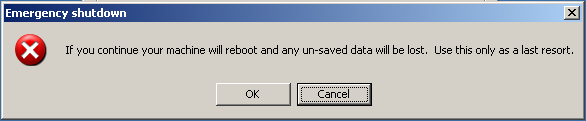
EMERGENCY SHUTDOWN!
Handy for when you don’t want the computer to write anything to the user’s (generally “roaming”) hive/profile before reboot. Otherwise, don’t use this if a normal shutdown is possible!
- Control+Alt+Delete
- Control click on “Shut Down…”
- Click “OK”